NetSuite Account Reconciliation

Prove every
balance.

Month-end reconciliations usually live in spreadsheets. A workbook per account, a sign-off in an email, a variance explained from memory. NetSuite Account Reconciliation brings them into NetSuite, with the evidence attached.
icon arrow
Book a 20 minute walkthrough
Already a Jcurve NetSuite customer? Ask your account manager.

See balance comparison, transaction matching and sign-off inside NetSuite, in about a minute.

Where do your reconciliations actually live?

If the honest answer is “in a spreadsheet”, the close depends on 
that file and the person who built it
The workbook one person understands

Each account has its own spreadsheet, its own logic and its own owner. When that person is away, the reconciliation waits.

The sign-off nobody can find

The auditor asks who reviewed the account and when. The answer sits in an email thread, if it was written down at all.

The matching done by hand

Bank, card and intercompany lines get ticked off one at a time, so the close moves at the pace of the slowest match.

AT MONTH END

What your finance
team does in NetSuite

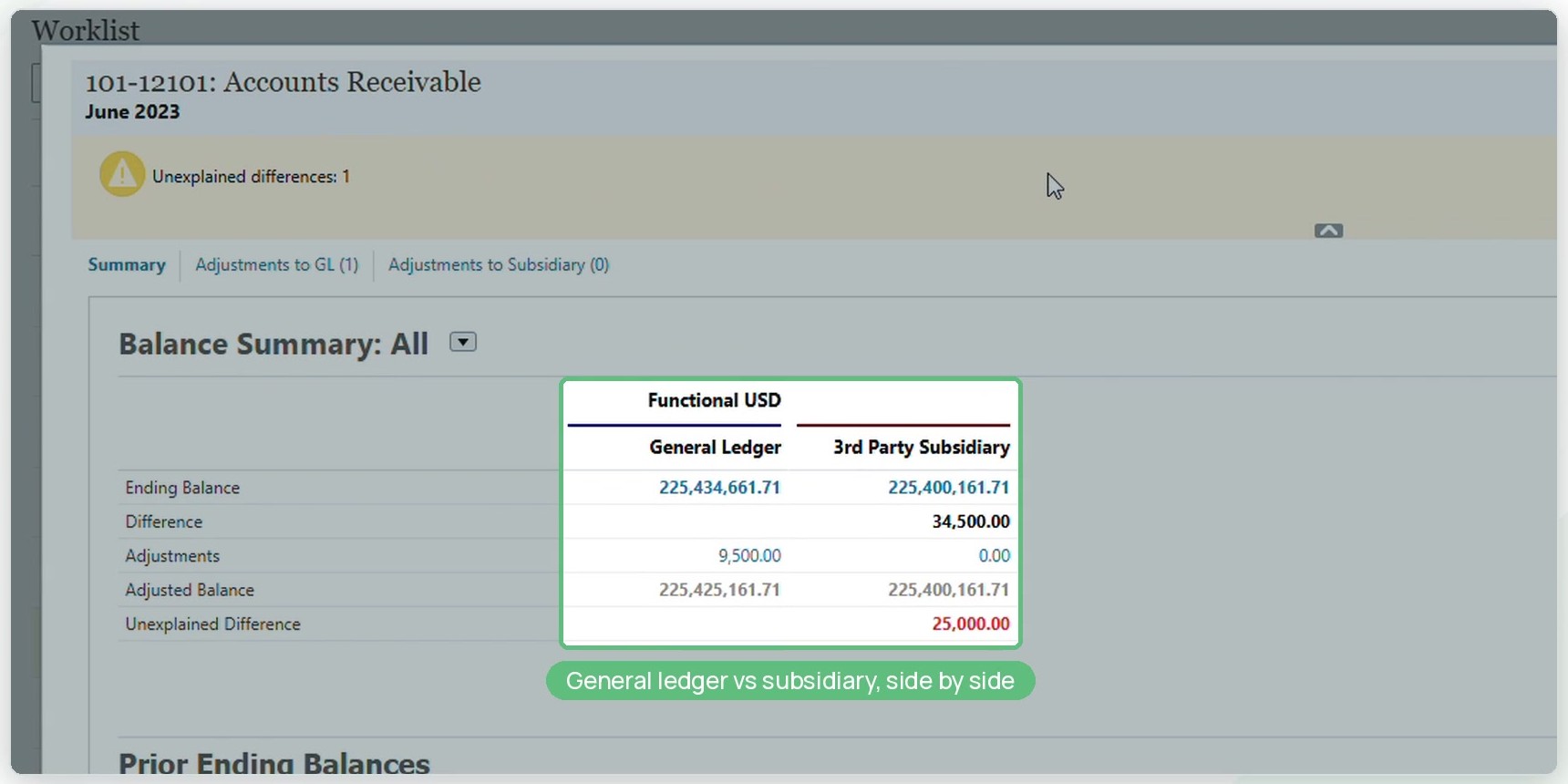
Reconcile against the ledger, side by side

Compare the general ledger with bank records, subledgers and other sources. Drill back to the NetSuite transaction behind any reconciling item.

Let rules do the matching

Set rules for one-to-one, one-to-many and many-to-many matches. Suggested matches are there to accept or discard, and exceptions are left for a person to look at.

Capture preparer, reviewer and sign-off

Every reconciliation has an owner and a reviewer, with approval workflow, notifications and a full history of every action.

Explain the movement

Flux analysis explains balance changes month on month, quarter on quarter or year on year, so the commentary is not rebuilt each period.

One place to see the status of every account, and the evidence behind it.

From the video: general ledger and subsidiary balances compared side by side.

BUILT FOR NETSUITE

Reconciliations that live with the ledger

NetSuite Account Reconciliation is Oracle NetSuite’s own reconciliation product, natively integrated with NetSuite. Transactions come straight from NetSuite, and accountants can drill back to the source transaction behind any reconciling item.

Prebuilt formats

Start from best-practice reconciliation formats, or build your own.

Secure evidence

Supporting documents are stored against the account, so reconciliations are not lost or altered.

Close task management

Schedule, assign and monitor close tasks from one dashboard.

Multi-currency

Entered and functional currencies shown side by side.

Added to the NetSuite you already run.

Account Reconciliation is an add-on to your existing NetSuite account.
Talk to Jcurve to see whether it fits how your team closes the month.

NETSUITE ACCOUNT RECONCILIATION

Start with
a conversation

Already a Jcurve NetSuite customer? Your account manager can arrange a walkthrough.

HOW IT WORKS

Walkthrough

See reconciliation and matching in the product, using an account like yours.

Scope

The accounts, formats and matching rules are mapped with your team.

Licence

Account Reconciliation is added to your NetSuite account.

Set up

It is configured and handed over to your finance team.

icon arrow
Talk to us about Account Reconciliation

Built for finance teams whose balance sheet has to stand up

Account Reconciliation earns its place when there are many accounts to
reconcile, high transaction volumes, or an auditor who wants to see the evidence.

Multi-subsidiary groups

Multi-currency operations

High-volume bank and card transactions

Intercompany balances

Businesses with an annual audit

Teams working to a tight close calendar

Book a demo.

See NetSuite Account Reconciliation in action, and talk to us about how it could fit the way your team closes the month.

Please provide your details below.